Share your screen without leaking customer data
Veil is a free Chrome extension that covers sensitive data on web pages before anyone else sees your screen. Turn it on once for a site, and every email, card number, API key or amount on that site is masked on every visit, whether you share a tab on a call, pair with a teammate or stream.
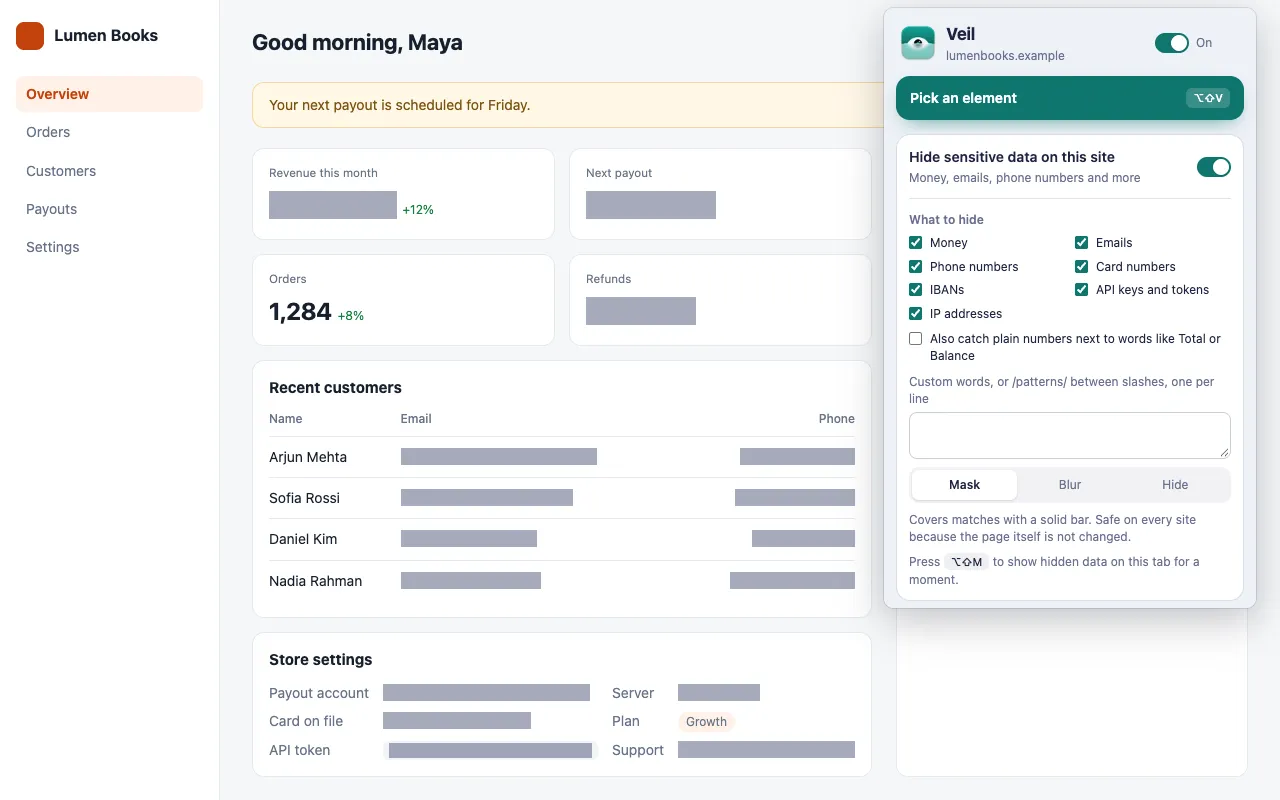
How do I hide sensitive data before sharing my screen?
Open the site, click the Veil icon, and turn on Hide sensitive data on this site. Veil then covers every match of the types you select, including data that loads later.
- Open the site you plan to share.
- Click the Veil icon and turn on Hide sensitive data on this site.
- Under What to hide, select the types. Only money is selected to start with.
- Choose a style: Mask, Blur or Hide.
The setting applies to the whole site and stays on for every visit. See Hide sensitive data on a site for every option.
Does it work in Zoom, Google Meet and Microsoft Teams?
Yes. Veil covers the data in the Chrome tab itself, so any app that shares that tab or your screen shows the covered version.
Veil does not change what the page’s own scripts can read. It hides data on screen only.
What data can Veil find on its own?
Veil finds data with a known format and checks it to avoid false matches:
| Type | Example | Check |
|---|---|---|
| Money | $1,240.50, Rs. 1,00,000 |
Skips version numbers, years, percentages and phone numbers |
| Emails | jane@example.com |
Needs a name, an @ and a domain |
| Phone numbers | +880 1712-345678 |
9 to 15 digits |
| Card numbers | 4242 4242 4242 4242 |
Must pass the Luhn checksum |
| IBANs | DE89 3704 0044 0532 0130 00 |
Must pass the IBAN checksum |
| API keys and tokens | sk_live_…, ghp_…, AKIA…, JWTs |
Known key formats only |
| IP addresses | 192.168.1.10 |
IPv4 only |
Names, street addresses and bank account numbers have no reliable format, so Veil does not look for them. Pick those elements instead, or add your own words or /regular expressions/ in the custom box.
How do I check what is covered before I go live?
Press Show hidden data (Alt+Shift+M) to show everything Veil hides on the current tab, then press it again to cover it. Do this before you start sharing.
Also before you share:
- Open the pages you plan to show first. On a slow page, data can flash on screen before Veil’s first scan.
- Check that the right types are selected for each site.
The full list is in Before you share your screen.
Can I pause Veil in the middle of a call?
Yes. Pause all changes (Alt+Shift+X) turns every Veil change off, and pressing it again turns them back on. The switch in the popup header does the same.
Pairing with a teammate
When someone watches you debug, the risky data is often technical: a live secret key in a settings page, a server IP in a log, a test card number in a checkout. Select API keys and tokens, IP addresses and Card numbers for that site once, and they stay covered on every visit.
Veil skips code elements such as code and pre for every type except API keys and tokens, because pages often show keys in code elements.
Streaming to an audience instead? Read how to hide personal info while live streaming.
Get Veil
Veil is free, open source under the MIT License, and needs no account. It makes no network requests, and your rules stay on your device.
Add Veil to Chrome. Next, read how to hide personal info while live streaming.