Stream your browser without doxxing yourself
Veil is a free Chrome extension that covers personal data on web pages before it reaches your stream. Turn it on for the sites you show, such as your hosting dashboard, your email or an online shop, and your email, IP addresses, keys and card numbers stay covered on every visit, in every scene.
How do I hide personal info on stream?
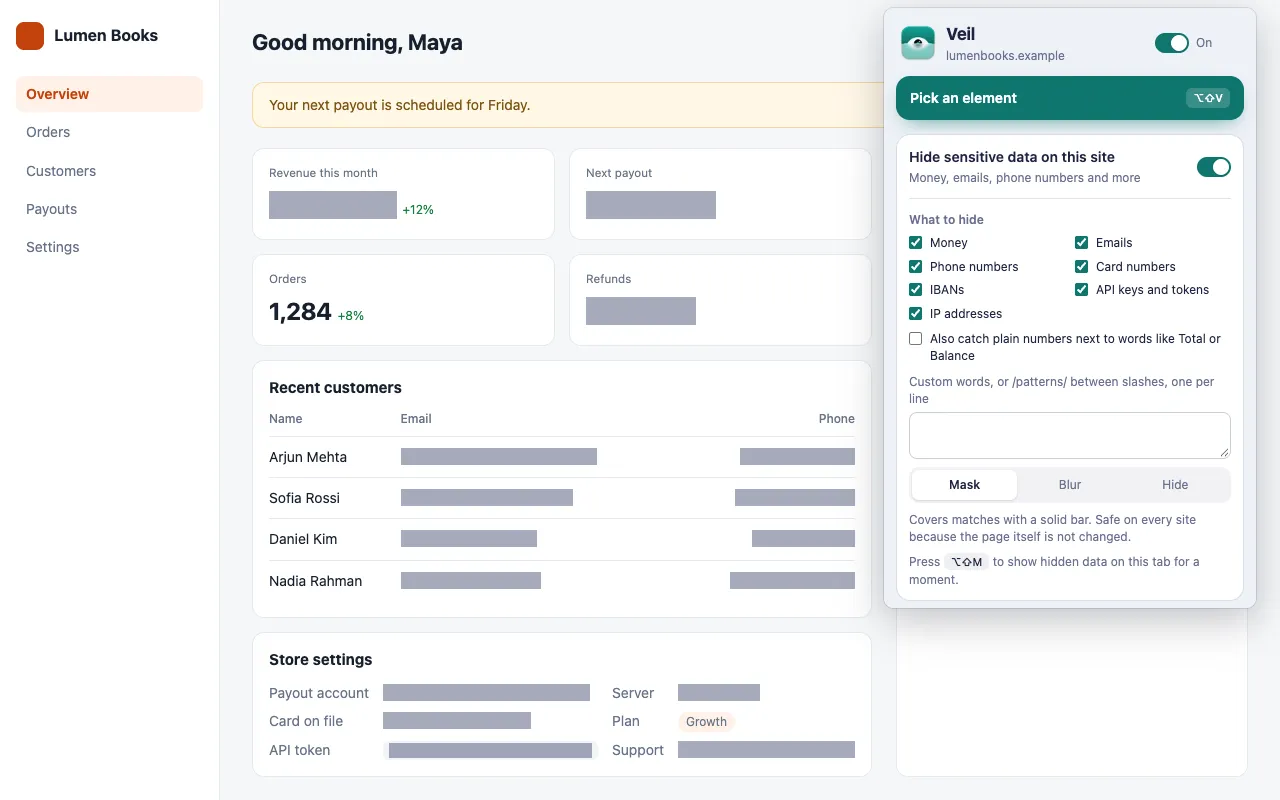
Turn on Hide sensitive data on this site for each site you show, and select every type that site displays. Veil covers matches in the page, so your streaming software captures the covered version.
- Before you go live, open the site and click the Veil icon.
- Turn on Hide sensitive data on this site.
- Under What to hide, select the types. Only money is selected to start with.
- Repeat for every site you plan to show.
What leaks on stream most often?
| What leaks | Where it shows up | What to select in Veil |
|---|---|---|
| Your email address | Account menus, settings, inboxes | Emails |
| Server IP addresses | Hosting dashboards, logs, DNS settings | IP addresses (IPv4 only) |
| API keys and tokens | Developer consoles, .env files in a web editor |
API keys and tokens |
| Card numbers | Checkout and billing pages | Card numbers |
| Phone numbers | Profiles and order pages | Phone numbers |
| Your name and home address | Order confirmations, shipping forms | Pick the element (below) |
Veil masks keys inside code and pre elements too, because pages often show keys there.
How do I hide my home address or real name?
Names and street addresses have no fixed format, so Veil cannot find them on its own. Press Pick an element (Alt+Shift+V), click the address, and choose Hide or Blur. Choose Whole site if the address shows on several pages of that site.
You can also add your name to the custom box, one entry per line, and Veil covers it wherever it appears on that site. See Hide specific words and names.
How do I stop data flashing on screen?
Open each page once before you go live. On a slow page, data can show for a moment before Veil’s first scan. After that, Veil covers matches as they load, including new rows, modals and pages in a single-page app.
Do not press Show hidden data (Alt+Shift+M) while live. It shows everything Veil hides on the current tab until you press it again.
What can Veil not hide on stream?
- Other apps. Veil works on web pages in Chrome only, not in your desktop apps, terminal or notifications.
- Images,
<canvas>charts, other sites’ shadow DOM components and gradient text. Pick the whole panel that holds them and hide it instead. - Chrome’s own pages. Chrome blocks extensions on
chrome://pages and on the Chrome Web Store.
See Known limits.
Get Veil
Veil is free, open source under the MIT License, and needs no account. It makes no network requests, and your rules stay on your device.
Add Veil to Chrome. Showing your product to a customer instead? Read how to hide customer data in live demos.