Screenshot a bug without leaking secrets
Veil is a free Chrome extension that masks API keys, tokens, emails and other sensitive data on the page before you take a screenshot. Your screenshot tool captures the masked page, so you can attach it to a public GitHub issue or a support ticket without redacting it by hand.
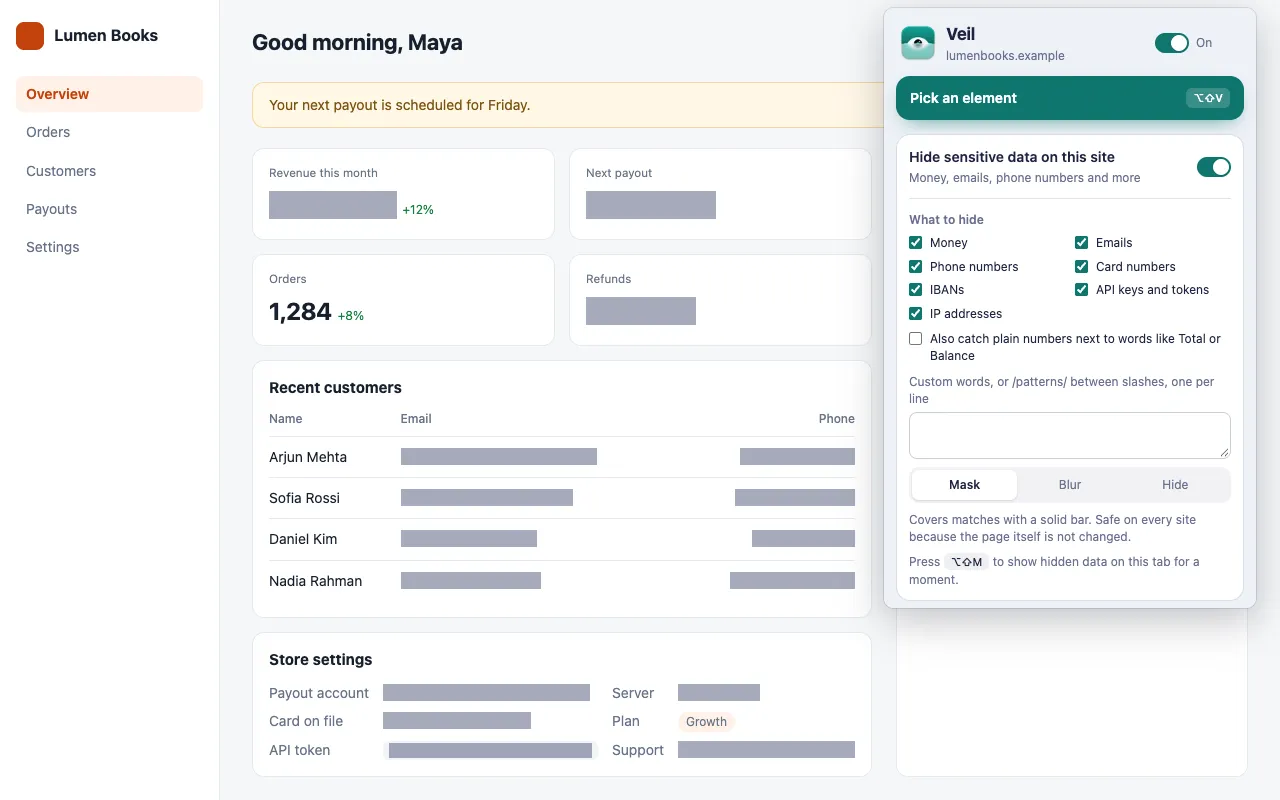
How do I hide an API key before taking a screenshot?
Turn on Hide sensitive data on this site and select API keys and tokens. Veil masks every key it recognizes on the site, and you can take the screenshot with any tool.
- Click the Veil icon on the page with the bug.
- Turn on Hide sensitive data on this site.
- Under What to hide, select API keys and tokens, plus any other types the page shows.
Which keys and tokens does Veil recognize?
Veil looks for known key formats only, so it does not mask random strings:
- Stripe keys:
sk_live_…,pk_test_… - GitHub tokens:
ghp_…,github_pat_… - Shopify tokens:
shpat_… - AWS access key IDs:
AKIA… - Google API keys:
AIza… - Slack tokens:
xoxb-… - Keys that start with
sk-, such as OpenAI and Anthropic keys - JSON Web Tokens (JWTs)
Veil masks keys inside code and pre elements too, because pages often show keys there. To mask a secret in another format, add it to the custom box as a word or as a /regular expression/, such as /INV-\d+/. See Hide specific words and names.
What else should I hide in a bug report screenshot?
Select every type the page shows. For a bug report, the usual ones are:
| Type | Why |
|---|---|
| Emails | Your own and your customers’ addresses |
| IP addresses | Server and webhook addresses in settings or logs (IPv4 only) |
| Card numbers | Test or real cards in a checkout; they must pass the Luhn checksum |
| Money | Balances and revenue on a dashboard |
For a name, an avatar or anything else without a fixed format, press Pick an element (Alt+Shift+V) and choose Hide or Blur. See Pick an element and change it.
Veil covered the text I need to show
Pick the element, or right-click it and choose Veil this element, then click Keep this visible when hiding sensitive data. The popup shows how many elements you have kept visible and lets you reset them.
Is the screenshot safe to post?
The pixels are. Veil hides data on screen only, so the masked values never reach the image. Do not attach a HAR file, a page source or console output with the same report, because the page still holds the original data. See Known limits.
Get Veil
Veil is free, open source under the MIT License, and needs no account. It makes no network requests, and your rules stay on your device.
Add Veil to Chrome. Hiding your own balance instead? Read how to hide money amounts on any website.