Hide any word or pattern you choose
Veil is a free Chrome extension that hides words you list on a website: a client’s name, a project codename, an internal hostname, or every invoice number that matches a pattern. Add them once for a site, and Veil covers them on every page of that site, including text that loads later.
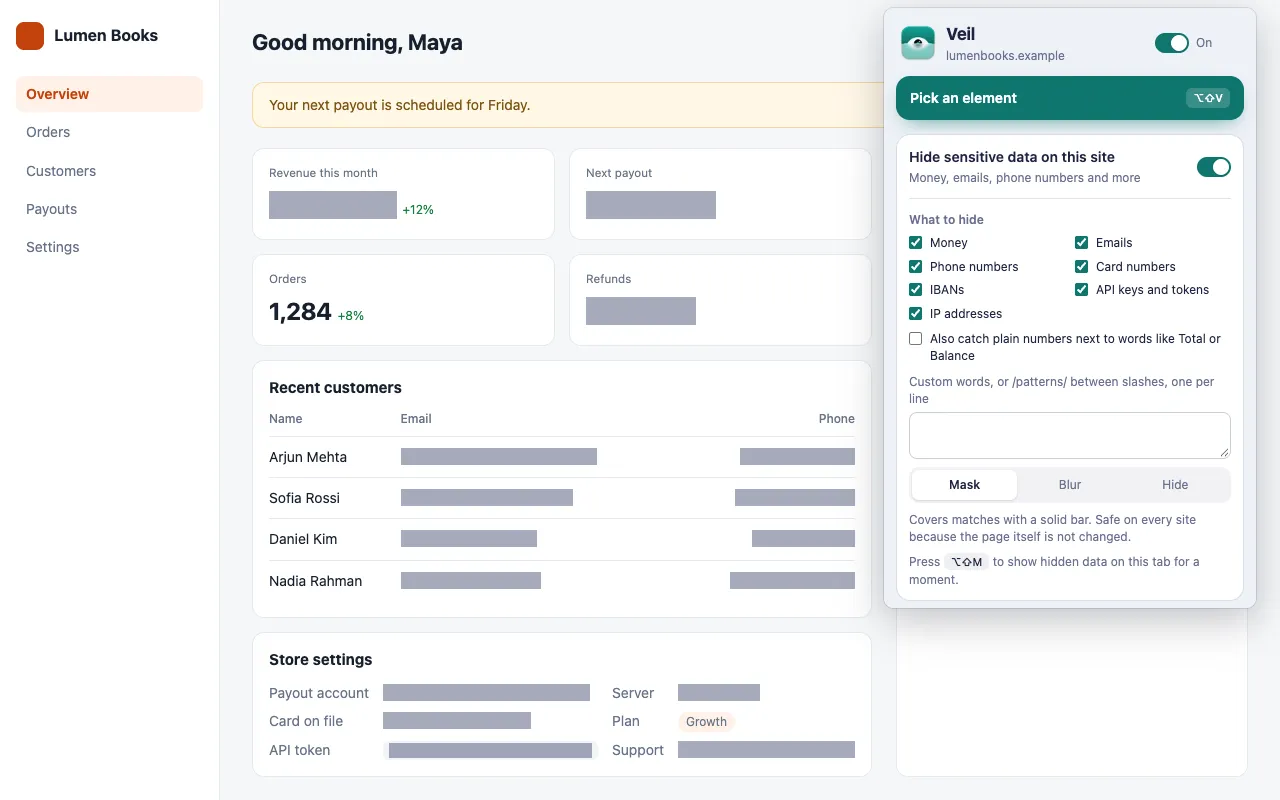
How do I hide a specific word on a website?
Turn on Hide sensitive data on this site, then type the word in the custom box under What to hide, one entry per line. Veil covers every match on the site with the style you chose.
- Click the Veil icon on the site.
- Turn on Hide sensitive data on this site.
- In the box labeled Custom words, or /patterns/ between slashes, one per line, type your entries.
Each site keeps its own list. To remove the list, delete its Custom row under Sensitive data in the popup.
How do plain entries match?
A plain entry matches that exact text anywhere on the page, and case does not matter:
| Entry | Matches | Note |
|---|---|---|
Acme Corp |
Acme Corp, ACME CORP |
Case does not matter |
Ann |
Ann, and the start of Annual |
Plain entries also match inside longer words |
To match a whole word only, use a regular expression with word boundaries: /\bAnn\b/.
Can I hide a pattern, like invoice numbers?
Yes. Put a regular expression between slashes, such as /INV-\d+/, and Veil covers every match.
| Entry | Hides |
|---|---|
/INV-\d+/ |
INV-2041, INV-7 |
/PRJ-[A-Z]{3}/ |
PRJ-FAL, PRJ-OSP |
/\b(Falcon|Osprey)\b/ |
The codenames Falcon and Osprey |
/[\w-]+\.internal\.example/ |
Internal hostnames such as db-1.internal.example |
Rules for patterns:
- Every pattern is case-insensitive. Flags after the closing slash are ignored.
- A pattern that is not a valid regular expression is skipped.
Where does Veil not look for my words?
Veil does not match custom words inside code elements (code, pre, kbd and samp), because pages show code there that is rarely private. To hide text inside a code block, pick the element instead: press Pick an element (Alt+Shift+V) and choose Hide or Blur.
Veil also cannot reach text in images, <canvas> charts, other sites’ shadow DOM components or text with a gradient fill. See Known limits.
What else can Veil find without a list?
Money, emails, phone numbers, card numbers, IBANs, API keys and IP addresses have known formats, so you only need to select them. See Hide sensitive data on a site, or read how to hide money amounts on any website.
Get Veil
Veil is free, open source under the MIT License, and needs no account. It makes no network requests, and your rules stay on your device.
Add Veil to Chrome. Want to replace a name instead of hiding it? Read how to change text on any website.